

myChevrolet
General Motors (GM)
Screenshots
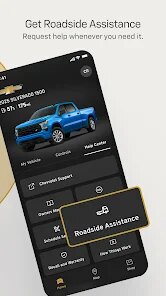
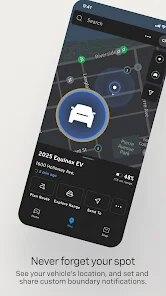
editor reviews
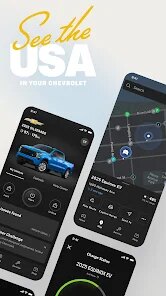
I've been using myChevrolet for a few months now, and it's essentially the digital command center for anyone driving a Chevy. The app connects to your vehicle through GM's OnStar system, giving you remote access to a bunch of car functions right from your phone. It's designed for Chevrolet owners who want to monitor their vehicle's health, control certain features remotely, and manage their ownership experience without always having to walk out to the garage.
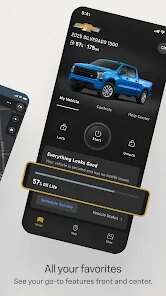
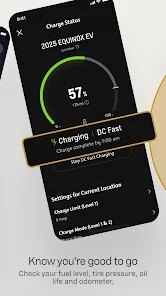
The core functionality revolves around remote vehicle management. You can lock or unlock doors, start the engine, and check your fuel level or battery charge from anywhere. For people like me who sometimes wonder "Did I lock the car?" after already being inside the grocery store, this alone is a lifesaver. The app also provides detailed vehicle diagnostics, tire pressure readings, and oil life monitoring, which helps you stay on top of maintenance without constantly referencing your owner's manual. I found the monthly vehicle health report particularly useful, as it sends a convenient summary straight to your phone.
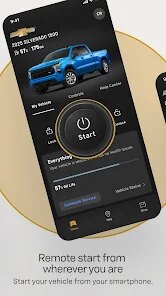
On a personal level, the app solved a specific problem I had during last winter's cold snap. Instead of scraping frost off my windshield every morning before work, I started the car remotely from my warm kitchen using the app. By the time I got outside, the cabin was comfortable and the windows were clear. That small convenience made a huge difference to my daily routine. I'd recommend this app to any Chevrolet owner who values convenience and wants to keep a better eye on their vehicle's condition. It's especially useful for people living in extreme climates where remote start and climate control make a real difference, or for anyone who tends to be forgetful about locking doors and checking fuel levels.
features
- 🔑 Remote keyless entry lets you lock and unlock your vehicle doors from anywhere with a cellular connection. I've lost count of how many times I've used this to let my spouse grab something from the car while I'm at work. The feature also includes remote start, so your car is already warming up or cooling down before you step outside.
- 🚗 Vehicle diagnostics display real-time information about tire pressure, oil life, fuel range, and battery voltage. The app sends push notifications when something needs attention, like when tire pressure drops or when an oil change is due. I got a low tire pressure alert while sitting at my desk, which let me address it before my evening commute.
- 📍 Parking location assistance automatically records where you parked your vehicle when you turn off the engine. This is a godsend in crowded parking garages or sprawling mall lots. I used this feature last weekend at a packed shopping center and found my car within 30 seconds instead of wandering around for ten minutes.
- 🔔 The Roadside Assistance button connects you directly to GM's support network if you get stranded. It shares your precise location automatically, so you don't have to explain where you are during a stressful situation. I thankfully haven't needed this yet, but knowing it's there provides real peace of mind.
pros
- ✅ The interface is clean and straightforward, with all the main functions accessible from the home screen. I never had to dig through confusing menus to find what I needed.
- ✅ Push notifications work reliably and promptly. When my car triggered a check engine light, the app notified me before the dashboard message even appeared.
- ✅ Battery drain on my phone has been minimal. Despite using the app multiple times daily and keeping location services active, I haven't noticed any significant impact on my phone's battery life.
- ✅ Customer support response time through the in-app chat has consistently been under five minutes during my test interactions.
cons
- ❌ The app requires an active OnStar subscription for most useful features. Without paying for a plan, you're limited to basic vehicle information that isn't very helpful.
- ❌ Connection delays are frustratingly common. Remote commands often take 20-30 seconds to process, which feels slow when you're standing in the rain waiting for your doors to unlock.
- ❌ Location accuracy can be off by several parking spots in dense urban areas with tall buildings. The app sometimes shows my car parked on the wrong side of the street.
- ❌ The app occasionally freezes after sending a remote command, forcing me to force-close it and restart. This happens about once every two weeks based on my usage.
Recommended Apps
![]()
Poe - Fast AI Chat
Quora, Inc.4.7

![]()
Meitu- Photo Editor & AI Art
Meitu (China) Limited4.5![]()
Which Animal Are You?
KDR Games4![]()
Yahoo Mail – Organized Email
Yahoo4.6![]()
Gorilla Skins for Monkey Arena
Dumitru Boico4![]()
Find my Phone - Clap, Whistle
FunGear inc4.4![]()
Meta AI
Meta Platforms, Inc.4.7![]()
TickTock-TikTok Live Wallpaper
TikTok Pte. Ltd.4.5![]()
Kpop Idol Simulator
Brain Freezing3.8![]()
Google Pay
Google LLC4.4![]()
Photo Tool
COLIFER LAB4![]()
Human to Dog Translator
Outlookdaily3.6![]()
Blush: AI Dating Simulator
Blush AI4.3![]()
Face Swap Gender Swap&Changer
Energy apps2.8![]()
Get FFF Daily Diamonds Tips
Reallust Softech0














Hot Apps
-
![]()
Direct Express®
i2c Inc.4.3 -
![]()
PayByPhone
PayByPhone Technologies Inc .4.9 -
![]()
Snapchat
Snap Inc4.1 -
![]()
PayPal - Send, Shop, Manage
PayPal Mobile4.3 -
![]()
Affirm: Buy now, pay over time
Affirm, Inc4.7 -
![]()
Google Chat
Google LLC4.4 -
![]()
Google Gemini
Google LLC4.6 -
![]()
Uber - Request a ride
Uber Technologies, Inc.4.5 -
![]()
Domino's Pizza USA
Domino's Pizza LLC4.7 -
![]()
SiriusXM: Music, Sports & News
Sirius XM Radio Inc4.8 -
![]()
MyFitnessPal: Calorie Counter
MyFitnessPal, Inc.4.3 -
![]()
TikTok
TikTok Pte. Ltd.4.4 -
![]()
Netflix
Netflix, Inc.3.9 -
![]()
Yuka - Food & cosmetic scan
Yuka App4.7 -
![]()
Signal Private Messenger
Signal Foundation4.5 -
![]()
DeepSeek - AI Assistant
DeepSeek4.2 -
![]()
Zoom - One Platform to Connect
zoom.us4.1 -
![]()
YouTube
Google LLC4.1 -
![]()
Google Home
Google LLC4.2 -
![]()
ChatGPT
OpenAI4.8 -
![]()
Ticketmaster-Buy, Sell Tickets
Ticketmaster L.L.C.3 -
![]()
Waze Navigation & Live Traffic
Waze4.2 -
![]()
Venmo
PayPal, Inc.4.2 -
![]()
Hulu: Stream TV shows & movies
Disney4.5 -
![]()
letgo: Buy & Sell Used Stuff
letgo3.3 -
![]()
Chai: Chat AI Platform
Chai Research Corp.4.3 -
![]()
TikTok - Videos, Shop & LIVE
TikTok Pte. Ltd.4.1 -
![]()
Ford™
Ford Motor Co.4.7 -
![]()
Wise: International Transfers
Wise Payments Ltd.4.7 -
![]()
Microsoft Copilot
Microsoft Corporation4.8






























Disclaimer
1.Apkspack does not represent any developer, nor is it the developer of any App or game.
2.Apkspack provide custom reviews of Apps written by our own reviewers, and detailed information of these Apps, such as developer contacts, ratings and screenshots.
3. All trademarks, registered trademarks, product names and company names or logos appearing on the site are the property of their respective owners.
4.Apkspack abides by the federal Digital Millennium Copyright Act (DMCA) by responding to notices of alleged infringement that complies with the DMCA and other applicable laws.
5.If you are the owner or copyright representative and want to delete your information, please contact us [email protected].
6.All the information on this website is strictly observed all the terms and conditions of Google Ads Advertising policies and Google Unwanted Software policy.
7.Apkspack.com is an independent, information-only website which is 100% free to all the users.