

Kling AI: AI Image&Video Maker
Lohas Games Pte. Ltd.
Screenshots





editor reviews
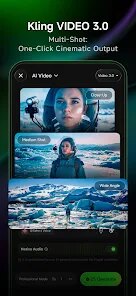
Kling AI is a creative tool designed to transform static images into short, dynamic video clips using artificial intelligence. The app's core purpose is to offer users an easy way to animate their photos, turning them into looping videos with realistic motion. It targets a broad audience: casual users who want to add flair to social media posts, content creators looking for quick video assets, and even professionals who need fast visual iterations for client work.
At its heart, Kling AI addresses the problem of video production being time-consuming and requiring technical skill. Instead of learning complex editing software, you can simply upload an image, let the AI analyze its elements, and watch it come to life. The main function works impressively well for straightforward subjects like landscapes, portraits, or objects, where the AI can intelligently generate natural movement. For example, I tried it with a photo of a quiet lake, and the app added subtle ripples and a gentle cloud drift that felt genuinely organic. This saved me from spending an afternoon learning masking and keyframing. However, more complex scenes with multiple moving parts sometimes produce odd distortions or jittery results, showing the technology still has limits.
The extra features, such as adjusting motion intensity or adding custom audio tracks, add real value by giving you more control over the final look. They do not overwhelm you with choices but provide enough flexibility to personalize the output. In my own use, Kling AI helped me create engaging short clips for a presentation without hiring a designer, solving the problem of needing quick, high-quality visuals on a tight deadline. I would recommend this app to anyone who wants to breathe life into their still images without learning video editing. It is especially useful for social media managers, teachers, small business owners, and hobbyists who need fast, creative results. For those who require professional-grade, flawless animation, this might not yet replace dedicated software.
features
- 🖼️ Smart Image analysis: The AI automatically identifies the main elements in your photo and determines what should move, like hair, water, or leaves, creating a natural and believable animation without manual input.
- 🎚️ Motion customization: You can adjust the speed and intensity of the movement, allowing you to choose between subtle, almost imperceptible motion or more dramatic, eye-catching effects that match your vision.
- 🔊 Audio integration: Add a soundtrack directly from the app's built-in library or upload your own music, syncing the video loop with sound for a more polished and shareable finished product.
pros
- ✅ Intuitive interface: The layout is clean and straightforward, making the entire process from image selection to video export simple even for first-time users.
- ✅ Fast processing: Generating a video from an image takes only a few seconds, which is great for iterating on ideas or producing multiple clips in a short session.
- ✅ Good animation quality for simple scenes: For photos with clear subjects and uncluttered backgrounds, the AI produces smooth and realistic motion that can be surprisingly convincing.
- ✅ No watermark on free version: This is a rare and generous feature, making the tool genuinely usable for creating content for public sharing without a paid plan.
cons
- ❌ Inconsistent results with complex scenes: Photos containing multiple objects, overlapping elements, or fine details can result in unnatural warping, flickering, or parts moving incorrectly, breaking the illusion.
- ❌ Limited output resolution: The exported videos are capped at a fairly low resolution, which looks fine on phones but appears noticeably pixelated when viewed on larger screens.
- ❌ Occasional app crashes: During testing, the app crashed a few times when processing larger or more complex images, forcing me to restart the whole process and lose my settings.
- ❌ No manual editing tools: You cannot mask out specific areas or fix problematic motion, leaving you with no option but to adjust the input image or accept the AI's results.
Recommended Apps
![]()
Poe - Fast AI Chat
Quora, Inc.4.7

![]()
Meitu- Photo Editor & AI Art
Meitu (China) Limited4.5![]()
Which Animal Are You?
KDR Games4![]()
Yahoo Mail – Organized Email
Yahoo4.6![]()
Gorilla Skins for Monkey Arena
Dumitru Boico4![]()
Find my Phone - Clap, Whistle
FunGear inc4.4![]()
Meta AI
Meta Platforms, Inc.4.7![]()
TickTock-TikTok Live Wallpaper
TikTok Pte. Ltd.4.5![]()
Kpop Idol Simulator
Brain Freezing3.8![]()
Google Pay
Google LLC4.4![]()
Photo Tool
COLIFER LAB4![]()
Human to Dog Translator
Outlookdaily3.6![]()
Blush: AI Dating Simulator
Blush AI4.3![]()
Face Swap Gender Swap&Changer
Energy apps2.8![]()
Get FFF Daily Diamonds Tips
Reallust Softech0














Hot Apps
-
![]()
PayByPhone
PayByPhone Technologies Inc .4.9 -
![]()
Amazon Alexa
Amazon Mobile LLC4.5 -
![]()
Blink Home Monitor
Immedia Semiconductor4 -
![]()
Ford™
Ford Motor Co.4.7 -
![]()
OfferUp: Buy. Sell. Letgo.
OfferUp Inc.4.4 -
![]()
CapCut - Video Editor
Bytedance Pte. Ltd.4 -
![]()
Cash App
Block, Inc.4.6 -
![]()
Microsoft Copilot
Microsoft Corporation4.8 -
![]()
Affirm: Buy now, pay over time
Affirm, Inc4.7 -
![]()
TikTok - Videos, Shop & LIVE
TikTok Pte. Ltd.4.1 -
![]()
Google Chat
Google LLC4.4 -
![]()
Snapmint: Buy Now, Pay in EMIs
Snapmint4.5 -
![]()
PayPal - Send, Shop, Manage
PayPal Mobile4.3 -
![]()
ChatBot - AI Chat
X PhotoKit4.5 -
![]()
PolyBuzz: Chat with AI Friends
CLOUD WHALE INTERACTIVE TECHNOLOGY LLC.3.8 -
![]()
FaceApp: Perfect Face Editor
FaceApp Technology Ltd4.4 -
![]()
Bolt: Request a Ride
Bolt Technology4.8 -
![]()
Microsoft Teams
Microsoft Corporation4.6 -
![]()
Klarna | Shop now. Pay later.
Klarna Bank AB (publ)4.3 -
![]()
Google Pay
Google LLC4.4 -
![]()
YouTube
Google LLC4.1 -
![]()
GroupMe
GroupMe4.5 -
![]()
letgo: Buy & Sell Used Stuff
letgo3.3 -
![]()
Wise: International Transfers
Wise Payments Ltd.4.7 -
![]()
WhatsApp Messenger
WhatsApp LLC4.4 -
![]()
Pinterest
Pinterest4.5 -
![]()
Chai: Chat AI Platform
Chai Research Corp.4.3 -
![]()
ChatGPT
OpenAI4.8 -
![]()
Zoom - One Platform to Connect
zoom.us4.1 -
![]()
ChatOn - AI Chat Bot Assistant
AIBY Inc.4.4





























Disclaimer
1.Apkspack does not represent any developer, nor is it the developer of any App or game.
2.Apkspack provide custom reviews of Apps written by our own reviewers, and detailed information of these Apps, such as developer contacts, ratings and screenshots.
3. All trademarks, registered trademarks, product names and company names or logos appearing on the site are the property of their respective owners.
4.Apkspack abides by the federal Digital Millennium Copyright Act (DMCA) by responding to notices of alleged infringement that complies with the DMCA and other applicable laws.
5.If you are the owner or copyright representative and want to delete your information, please contact us [email protected].
6.All the information on this website is strictly observed all the terms and conditions of Google Ads Advertising policies and Google Unwanted Software policy.
7.Apkspack.com is an independent, information-only website which is 100% free to all the users.